
ZuploZuplo
LoginSign Up
  • Documentation
  • API Reference
Introduction
Getting Started
    Develop using the Portal
      1 - Setup Your Gateway2 - Rate Limiting3 - API Key Auth4 - Deploy5 - Dynamic Rate LimitingMCP - Quick start
    Develop Locally
      1 - Setup Your Gateway2 - Rate Limiting3 - API Key Auth
Concepts
Development
    CORSEnvironment VariablesBranch-Based DeploymentsTestingTroubleshootingGitOps vs TerraformCustom Code
    Local Development
    Guides
      Advanced Path MatchingAPI VersioningOpenAPI Server URLsConvert URLs to OpenAPIOpenAPI Extension DataPath Modification ScriptsOpenAPI OverlaysCanary Routing for EmployeesGeolocation Backend RoutingUser-Based Backend RoutingBypass a PolicyTesting GraphQL QueriesHealth ChecksPerformance TestingTroubleshooting Slow ResponsesNon-Standard PortsHandling FormDataS3 Signed URL UploadsCheck IP AddressLazy Load ConfigurationSharing Code Across ProjectsBackstage IntegrationGitHub Action Automation
Policies
Handlers
API Keys
MCP Server
MCP Gateway
AI Gateway
Developer Portal
Monetization
Deploying & Source Control
Observability
Networking & Infrastructure
Account Management
Programming API
Build with AI
Zuplo CLI
Migration Guides
Platform LimitsSecuritySupportTrust & ComplianceChangelog
powered by Zudoku
Guides

Versioning on Zuplo

This guide explains how to approach versioning APIs on Zuplo.

The recommended versioning approach uses URL-based versioning. Read more at How to version an API.

Separate OpenAPI files

A best practice is to have separate OpenAPI files for different major versions of an API. A single Zuplo project can have as many OpenAPI routing files as needed. The default routes.oas.json file can be renamed, as shown here:
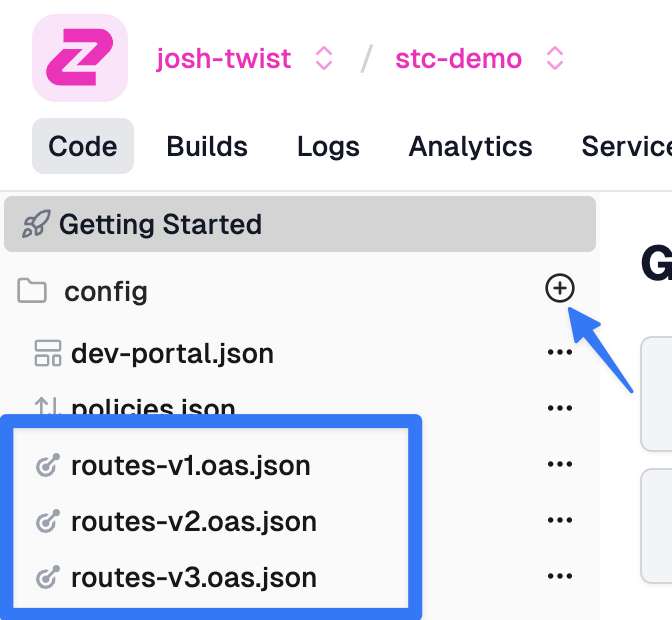
Multiple OpenAPI files

Note you can create a new OpenAPI file by clicking the '+' icon shown.

Each routing file would now have its own routes, each prefixed by /v1 and /v2.

Also update the info properties in the OpenAPI file to include the version. This helps users disambiguate versions in the developer portal:

Code
{ "openapi": "3.1.0", "info": { "title": "My Api (v2)", "version": "2.0.0" } }

When Zuplo generates the developer portal, each OpenAPI version appears in its own document, allowing users to select the version. This is presented as a dropdown:
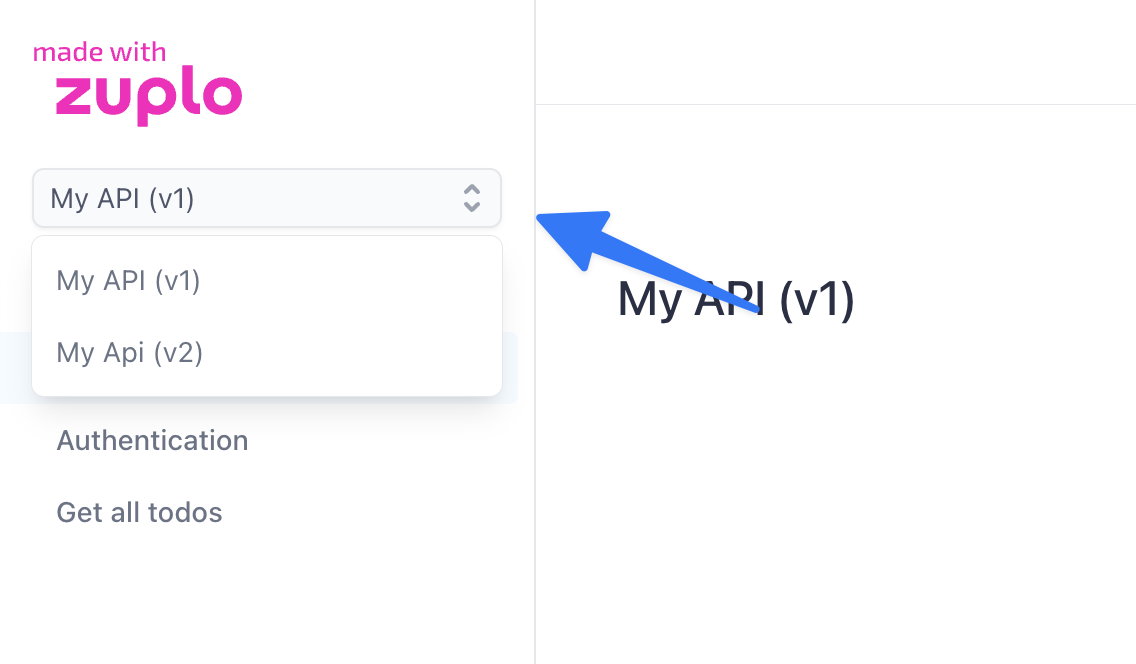
Multiple APIs in docs

Using Zuplo as a versioning layer

Because Zuplo is a programmable gateway it's a powerful tool in your versioning arsenal. For example, let's imagine you want to make a breaking change between v1 and v2 of your todos API where the todoItems in v2 won't include a piece of information in the previous version.

This can be entirely achieved in Zuplo by adding a v2 OpenAPI file and adding an identical route from v1 but changing the path:

/v1/todos ==> /v2/todos

The only other change you'd need to make to this new version is to add an outbound custom policy that removes the property, e.g.

Code
export default async function policy( response: Response, request: ZuploRequest, context: ZuploContext, options: never, policyName: string, ) { if (response.status === 200) { const json = await response.json(); json.forEach((item) => { delete item.userId; }); return new Response(JSON.stringify(json), response); } return response; }

And QED - your Zuplo gateway is being used to update your old API and make it shiny and new.

There's a video accompaniment for this document on YouTube here: Versioning an API on Zuplo

Edit this page
Last modified on March 27, 2026
Advanced Path MatchingOpenAPI Server URLs
On this page
  • Separate OpenAPI files
  • Using Zuplo as a versioning layer
JSON
TypeScript