

Environments
One of the things that makes Zuplo different from most API gateways, and API management platforms is that you can rapidly deploy many environments. Some of our customers have hundreds of deployed environments! This facilitates collaboration, where teams can collaborate on new features with a dedicated environment, deployed for no additional cost in under 20 seconds.
For a comprehensive guide to how branches map to environments, see Branch-Based Deployments.
Environment Types
There are three types of environments on Zuplo - Production, Preview, and Development (called Working Copy). Each environment has a unique URL and every environment is deployed to 300+ edge locations around the world.
Development (Working Copy)
This is your development environment. You can think of this as your personal
cloud laptop. To deploy to this environment you just need to save a change in
portal.zuplo.com, that will automatically trigger a build and deploy of your
working-copy. A working-copy environment ends in a .dev URL. While these
environments are deployed to the edge in 300+ data centers around the world,
they're optimized for development purposes. There are some minor differences
with production and preview environments with caching and other features.
Preview
These are environments that are deployed using the GitHub integration or building a custom CI/CD pipeline. Preview environments are deployed from any branch that isn't set as your default (for example production branch). Preview environments are deployed to the edge and have the same behavior as production environments, but are typically used for staging, testing pull requests, etc.
Production
These are environments that are deployed using the GitHub integration or building a custom CI/CD pipeline. Each project has only one Production environment and is deployed from the git branch that's set as your production branch in your source control settings.
Changing the Production Environment
The Production environment is determined by your repository's default branch setting (configured in your Git provider, not Zuplo). To change which branch deploys to Production:
- Go to your Git repository settings:
- GitHub: Settings > General > Default branch
- GitLab: Settings > Repository > Branch defaults
- Bitbucket: Repository settings > Branching model
- Azure DevOps: Project settings > Repositories > Default branch
- Change the default branch to your desired branch
- Zuplo automatically treats the new default branch as Production
Changing the default branch affects which environment receives Production environment variables and uses the Production API key bucket. Plan this change carefully.
Preview vs Production Environments (or multiple Production Environments)
There is no technical difference between a Production environment and a Preview environment. Both deploy to the same infrastructure, run in the same 300+ edge locations, and have identical performance characteristics. The "production" label simply means "deployed from the default branch." It controls which set of environment variables and API key buckets apply by default, but the underlying deployment is exactly the same.
Some customers choose to use a specific (or multiple) Preview environments as
"production" deployments of their API. For example, you might deploy your US
traffic from main (Production) and your EU traffic from an eu-production
branch (Preview). This works because the environments are technically identical.
Environment variables and API key buckets can be overridden for specific Preview
environments to support this pattern.
For a comprehensive overview of how source control, branches, and environments relate to each other, see Source Control and Deployment.
Navigating Environments
On the bottom toolbar of the Zuplo Portal you will see a selector for the current environment. You can switch between environments by clicking on the name of the current environment and then selecting another environment. To see the full list, open the Environments tab in your project.
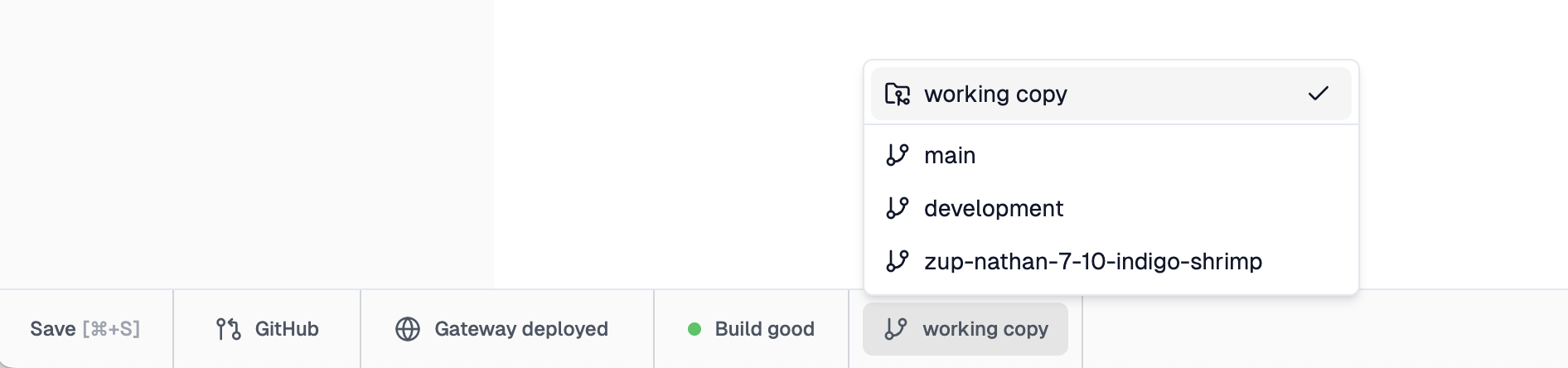
Your development (working copy) environment will be listed at the top in a separate section. Your git deployed environments will be listed next with the production environment on top.
For users using source control integration the name of the deployment matches the branch name (yes - creating a new environment is literally as easy as creating a new branch).
You can't edit the code of an production or preview environment in portal.zuplo.com but you can switch into those environments to perform a number of functions, such as:
- edit API consumers for this environment
- view analytics for this environment
- view Live Logs for this environment
Different Backends per Environment
It's common to want a different backend for your production, staging and preview environments. This can be easily achieved by using environment variables to specify the origin of the backend and then using that in your URL Rewrite Handlers.
For example,
Code
A url rewrite like this will combine the BASE_PATH environment variable, say
https://example.com with the incoming path, for example /foo/bar to create a
re-written URL:
Code